
Trying to find the best portable monitor for gaming is usually a depressing task.
Even in 2021, most portable monitors are clunky, battery-draining gadgets that add to your load without adding much to your rig. Did you know that some monitors still don’t come standard with USB ports?
Yeah, it’s that bad.
Luckily, there’s a new monitor coming to rescue gamers from tiny screens and disappointing monitors. It’s called Desklab, and it’s the most advanced, portable, and universally compatible monitor for gamers.
Desklab is a multi-tasking machine. It does a bunch of different things so you can keep your bag clear of clutter. It’s your charger, speakers, 4K gaming monitor, adapters, and a lot more. It’s so thin and light that it feels like you’re holding a manila folder—-but it still manages bright, crisp 4K with true LED backlighting. It seems like it came straight from the future.

The reason Desklab is our choice for gamers is that it can do all of this AND it’s compatible with any gaming device ever made. You can use it with your PC, laptop, phone, and tablet. It’s also compatible with all consoles, including next-gen systems and retro ones (with the right adapter). It also works with Mac and PC (as well as all other operating systems and computers).
Desklab is the monitor that will make 4K gaming portable for everyone.
Below, we’re going to dig into Desklab to tell you everything we love about this monitor (as well as a few drawbacks). If you want to skip to the specs and check it out yourself, you can visit the Desklab homepage here. With this link, you can also get 50% off of your Desklab for a limited time.

Desklab Pros and Cons
Pros:
- 4K Ultra-HD with true LED backlighting for brilliant color
- The lightest, thinnest 15” monitor ever made
- Compatible with all games and devices, old and new (Mac, PC, consoles, retro, mobile, etc.)
- Tons of ports for easy connectivity (HDMI, USB-C, Micro-USB, headphone jack)
- 2x brighter than leading monitors
- Touchscreen sensitivity optimized for 4K resolution
- Fast response time (<10 ms)
- Built-in Hi-Fi audio
- Adapters and charger included
- Eye protection (anti-glare, anti-flicker, low blue light)
Cons:
- Magnetic stand seen in ads is not included with purchase
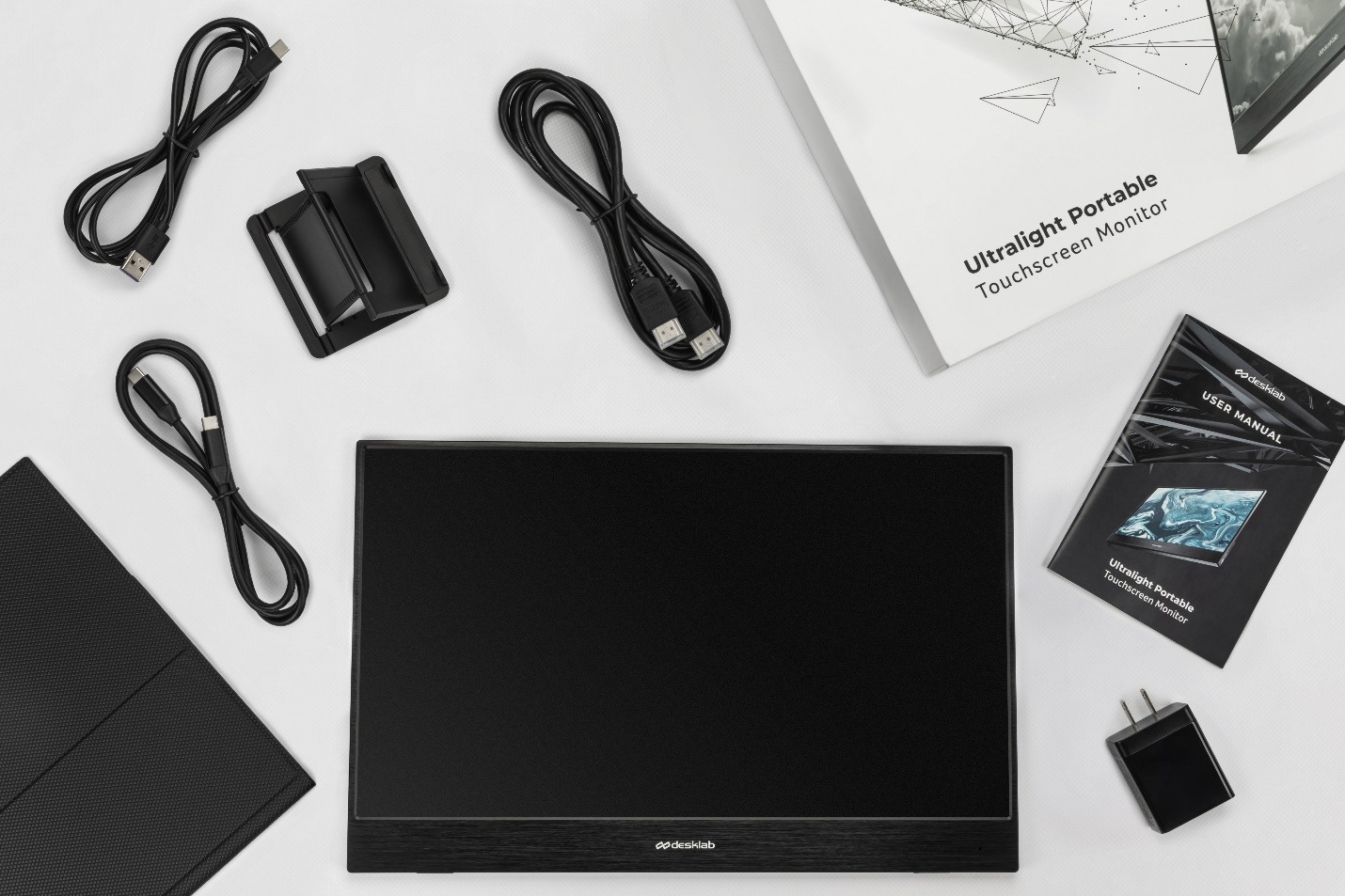
- Included adapters are short
- Audio is not very loud

Desklab: Standout Features
One Monitor for Every Game
We’re tired of monitors that aren’t compatible with all of our stuff. We want to be able to hook a monitor up to an Alienware laptop, an HP PC, an iPad, and a Samsung phone without getting blue screens.
Desklab can do that, plus more. Thanks to its true universal compatibility, you can use Desklab for EVERYTHING, including all your games.
And we mean ALL of your games. You can plug in your phone or tablet to play mobile games in 4K at 15” on Desklab’s touchscreen. You can also pair Desklab (or multiple Desklabs) with your PC or laptop to build an easy, lightweight gaming rig.
Desklab works with all consoles, so you can take Desklab and your PS4 Slim on vacation or to a friend’s house and play in 4K. Or, you can replace your little Switch screen with a bigger, better-looking alternative.
You can even hook up your retro systems for an instant boost in color and resolution. We connected Desklab to Gamecube and had a little fun with Metroid Prime. It looked better than ever.

Lots of Ports
One reason that Desklab is so easy to game with is that you don’t have to search for adapters and dongles for every little thing. This monitor has enough ports to connect to nearly anything without hassle. Desklab’s ports include:
- 2x USB-C
- Micro USB
- HDMI
- 3.5 mm jack
It even comes with some adapter cables too, like HDMI to mini-HDMI and a USB-C charger, so you’ll be ready to connect to consoles, laptops, phones, and more.
Desklab automatically calibrates its settings for every device you plug in. That means you’ll get the best picture and color for every device and every game. No more distorted screens and weird colors! Though, if you want to adjust the settings, you can do so via Desklab’s menu.

The Most Portable Monitor Ever
Aside from being compatible with every gaming medium, Desklab is actually worth taking with you on the go. It’s so light and thin that you won’t have to have that little conversation in your head that goes like this, “Is it really worth carrying this around all day?”
Desklab weighs 1.3 lbs and is just 6 mm thin. That’s half as light as MacBook Air and slimmer than iPad Air.
It legitimately feels like you’re holding a file folder in your hands. It’s almost shocking to see the depth of Ultra HD 4K coming from such a thin device. It feels like you can reach right into the screen.
Desklab slides into your laptop case with your laptop, even if you’re short on space. And it fits in any backpack or bag without adding to your load. When you’re ready for a little gaming break at work, on the bus, or at the park, you can take out Desklab and start playing in seconds.
It’s also a huge benefit to be able to turn your tiny phone screen into a 15” touchscreen monitor in 4K. While mobile games look awesome, it’s also great for streaming and working.

4K is Brighter and Better
We don’t have to tell you that 4K gaming is the future. You’ve probably already had your mind blown while playing in 4K. I’ve got a 4K TV at home, so I thought that Desklab wouldn’t surprise me too much. But I was wrong.
There’s something really special about holding a 4K screen in your hands. Playing Battlefront 2 on my lunch break in 4K was a literal game-changer. I knew at that moment that 4K mobile gaming wasn’t something I wanted. It was something I needed.
Desklab’s 4K is more accessible and better-looking than competitors, namely because it’s a brighter monitor. Desklab is about 2x brighter than other monitors, meaning you can play it outdoors and in well-lit environments and still enjoy a clear 4K experience.
Added to that is anti-glare and anti-flicker protection, which make it even easier to play under the sun or fluorescent lights.

Touchscreen Made for 4K
As we said before, it’s great to be able to upscale your mobile games without losing the touchscreen functionality. But with Desklab, it’s actually an upgrade.
Desklab is made with new touchscreen tech that is more sensitive for the 4K generation. More detailed images benefit from greater touch sensitivity. For editors, photographers, and artists, this means more control over your work, down to the finest details, with a finger or a stylus.
For gamers, it means a more fluid and immersive experience when playing games with touch functionality. This makes a huge difference with games like Fortnite and Angry Birds on mobile, for example.
Decent Response Time
Desklab isn’t just for console gaming and playing your mobile apps on the big screen. It can handle immersive worlds and intense multiplayer action online. With a <10 ms response rate, you’ll have the speed you need to prevent lag for nearly all games.
Desklab might not have the sharpest response rate of any monitor, but it clocks fast enough to cover 99% of our needs, at least. We had no issues with COD and League of Legends when playing online. If you’re a real stickler, you can spend double for a few ms less, but you likely won’t see a difference.

Built-in Speakers
Speakers aren’t exactly a new feature in portable monitors, but we wanted to mention the audio in Desklab because it’s actually better than the average laptop speakers, which is rare.
Usually, monitor speakers are so bad that they aren’t worth the hardware or space. But Desklab’s Hi-Fi audio is alright by us. It’s not spectacular, but it will keep you from hauling around a Bluetooth speaker.
However, we usually just plug our headphones into Desklab’s headphone jack. This is especially helpful when connecting to “certain” phones that no longer have headphone jacks.

Desklab: A Few Drawbacks
No Case Included
We love how slim Desklab is. But because it’s essentially just a screen, it really needs a protective case, and you won’t get one included with your purchase. This is a little confusing because all of the Desklab ads show it with a magnetic case.
You can add a magnetic case to your order for about $20, so it’s not a huge deal. It just would have been nice if it was included.
Adapters are short
Desklab comes with some bonus adapters so you don’t have to buy USB-C or Mini HDMI adapters. That’s not common, and we really appreciate it, especially considering Desklab already has better connectivity than most other monitors.
However, the adapters they supply are pretty short. They’re only useful if you’re using Desklab directly next to the device it’s connected to. This means you won’t have issues when using Desklab as a second monitor for your PC or laptop. But if you want to use Desklab with a console, you’ll need to put it right next to the console.
If you want more flexibility, you’ll have to buy longer cables.
Audio isn’t too loud
Desklab’s Hi-Fi audio is quite clear, but it doesn’t get very loud. If you’re gaming alone in a quiet place, you won’t have any problems, But if you’re in public or with friends, it might be a little hard to hear.
Experience Mobile Gaming in 4K with Desklab
Once you experience 4K gaming on the go, you won’t be able to accept anything else. Going back to a little tablet or phone is not just depressing, but it also hurts your ability to excel in the game. Plus, those little screens can be terrible for your eyes.
Desklab is an absolute treat for gamers, and it makes mobile gaming bigger and better. It’s also great for work, design, art, coding, and a bunch of other things. But we’ll worry about all that stuff later….
Finally, Desklab is priced fairly. Right now, you can get one for about $400, making it one of the most affordable 4K monitors on the market. However, this sale won’t last long, so get your Desklab now before they jack the price back up to $800.
Learn more about what Desklab can do and grab yours at desklabmonitor.com.